Meta Description:
Learn how a WhatsApp AI chatbot can increase sales, qualify leads, automate FAQs, follow-ups, bookings, and customer support for businesses in 2026
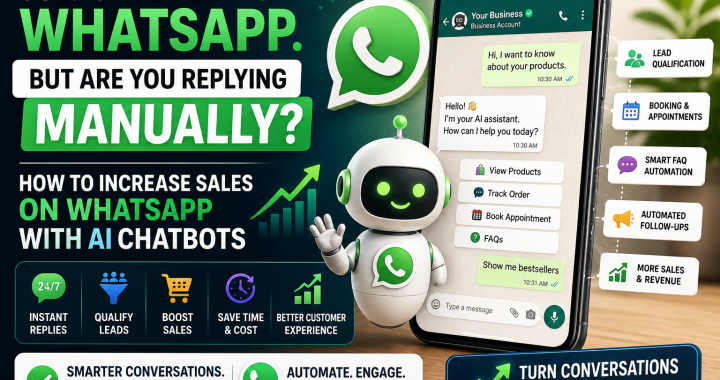
“98% open rate on WhatsApp. But are you replying manually?”
Imagine getting 50 customer messages while you’re busy, sleeping, or handling orders. By the time you reply, some customers have already purchased from your competitor.
That’s where a WhatsApp AI chatbot can make a major difference.
Instead of manually answering the same questions every day, an AI chatbot can help respond to customers, qualify leads, answer FAQs, recommend products, collect information, and move conversations toward a purchase.
For small businesses, coaches, and e-commerce brands, this can turn WhatsApp from a simple messaging app into a powerful sales channel.
In this guide, you’ll learn how to use a whatsapp ai chatbot to increase sales whatsapp campaigns, improve customer response times, and build a smarter sales process with whatsapp business ai 2026 strategies.
What Is a WhatsApp AI Chatbot?
A WhatsApp AI chatbot is an automated system that uses Artificial Intelligence to communicate with customers through WhatsApp.
Unlike a basic chatbot that only follows fixed buttons and predefined answers, an AI chatbot can understand natural-language questions and provide more flexible responses.
For example, a customer might type:
“Hi, I need a birthday gift under ₹2,000. What do you recommend?”
Instead of sending a generic “Please select an option” message, an AI chatbot can understand the customer’s request and recommend relevant products.
What Can a WhatsApp AI Chatbot Do?
Depending on your setup, it can help with:
- Answering customer questions
- Collecting leads
- Recommending products
- Sharing product information
- Booking appointments
- Sending follow-ups
- Qualifying prospects
- Supporting sales teams
- Handling frequently asked questions
The goal isn’t necessarily to replace your sales team.
The goal is to let AI handle repetitive conversations while your team focuses on high-value customers and complicated requests.
Benefits for Business
Why should a small business consider using a whatsapp ai chatbot?
1. Faster Customer Responses
Customers don’t always want to wait hours for an answer.
An AI chatbot can respond instantly to common questions, helping customers continue their buying journey.
2. 24/7 Availability
Your business may close at 8 PM, but customers can message you at midnight.
A chatbot can continue handling basic questions and collecting leads outside business hours.
3. More Qualified Leads
Instead of sending every inquiry directly to your sales team, AI can ask qualifying questions.
For example:
- What product are you interested in?
- What’s your budget?
- When do you need it?
- Where are you located?
Your team can then focus on leads that are more likely to convert.
4. Consistent Customer Experience
Manual replies can vary depending on who responds.
An AI chatbot can provide consistent information about products, prices, services, policies, and business hours.
5. Lower Repetitive Work
If your team answers “What is the price?” or “Do you deliver to my city?” dozens of times every day, automation can save significant time.
How AI Chatbot Works on WhatsApp Business
A typical WhatsApp AI automation system involves several components.
Step 1: Customer Sends a Message
A customer contacts your business through WhatsApp.
For example:
“Do you have this shirt in XL?”
Step 2: AI Understands the Question
The AI analyzes the customer’s message and identifies their intent.
Step 3: Chatbot Searches Relevant Information
Depending on your setup, the system can use your product catalog, FAQs, business information, or other approved data.
Step 4: AI Responds
The chatbot sends an appropriate response.
Step 5: Customer Moves Toward Purchase
The chatbot can provide a product link, collect details, connect the customer with a salesperson, or guide them toward checkout.
This conversational approach is an important part of whatsapp business ai 2026.
Step-by-Step Setup Guide
You don’t need to automate your entire business on day one.
Start small.
Step 1: Define Your Goal
Choose one primary goal.
For example:
- Generate leads
- Book appointments
- Sell products
- Answer FAQs
- Follow up with prospects
Step 2: List Common Questions
Write down the questions customers ask repeatedly.
For example:
- What are your prices?
- Do you offer delivery?
- How long does shipping take?
- What payment methods do you accept?
- Can I book a consultation?
Step 3: Prepare Your Business Information
Give your chatbot accurate information about your business, including:
- Products
- Services
- Pricing
- Business hours
- Delivery areas
- Refund policies
- Contact information
- FAQs
Step 4: Build Conversation Flows
Create simple conversation paths.
For example:
Customer: “I want to buy a product.”
Bot: “Sure! What type of product are you looking for?”
Customer: “Running shoes.”
Bot: “What’s your preferred budget?”
This helps the chatbot understand the customer before recommending the next step.
Step 5: Add Human Handoff
Not every conversation should remain automated.
Give customers an option such as:
“Would you like to speak with a sales expert?”
When the customer needs personal assistance, the conversation can be transferred to a human.
Step 6: Test Before Launch
Test different questions and scenarios.
Check whether the bot gives accurate answers and knows when to involve a human.
5 WhatsApp AI Chatbot Use Cases
1. Lead Qualification
Instead of collecting random inquiries, use AI to identify serious prospects.
For a coaching business, the chatbot could ask:
- What’s your current challenge?
- What result do you want?
- When do you want to start?
- Have you worked with a coach before?
The answers help your team prioritize leads.
2. Booking Appointments
Coaches, clinics, salons, consultants, and service businesses can use chatbots to help customers schedule appointments.
The bot can collect preferred dates, services, and contact information before confirming the booking.
3. Answering FAQs
Automate repetitive questions about:
- Pricing
- Products
- Delivery
- Working hours
- Services
- Policies
This can make customer support significantly more efficient.
4. Follow-Up
Many potential customers don’t purchase immediately.
AI can help organize follow-up conversations based on customer interactions.
For example:
Day 1: Product information
Day 2: Answer questions
Day 4: Share customer reviews
Day 7: Send a relevant offer
Follow-ups should be useful and permission-based rather than spammy.
5. Sales
The most important use case is helping customers move from interest to purchase.
An AI chatbot can:
- Understand customer needs
- Recommend relevant products
- Answer objections
- Share product details
- Provide a purchase link
- Connect the customer to a sales representative
That’s how businesses can use AI to increase sales whatsapp conversations without manually managing every message.
Best AI Chatbot Tools for WhatsApp
Your ideal tool depends on your business size and requirements.
WhatsApp Business Platform
Businesses can build official messaging solutions using Meta’s WhatsApp Business Platform and approved integrations.
AI Chatbot Platforms
Various chatbot and automation platforms can connect WhatsApp with AI, CRM systems, catalogs, and workflows.
When choosing a platform, look for:
- WhatsApp integration
- AI capabilities
- CRM integration
- Human handoff
- Analytics
- Automation
- Scalability
- Data and privacy controls
Don’t choose a tool simply because it has “AI” in its name.
Choose the platform that fits your actual customer journey.
Example: Shop Got 3x Replies
Consider a small online fashion shop that receives customer inquiries through WhatsApp.
Before automation, the owner manually responded to messages whenever they had time.
Many inquiries received delayed replies.
The shop introduced an AI chatbot that immediately handled product questions, size availability, delivery information, and basic recommendations.
The business then routed high-intent customers to a human salesperson.
After improving its response process, the shop reported 3x more replies from interested customers compared with its previous manual approach.
The lesson isn’t that every business will automatically get exactly 3x results.
The important takeaway is that fast responses + relevant conversations + human follow-up can create a stronger sales process.
WhatsApp Business AI in 2026: What to Focus On
The future of whatsapp business ai 2026 is not simply about sending automated messages.
It’s about creating better customer conversations.
Businesses can increasingly combine AI with:
- Customer data
- Product catalogs
- CRM systems
- Automated follow-ups
- Personalized recommendations
- Human sales teams
But remember: automation should improve customer experience, not annoy customers.
Always respect WhatsApp’s policies, customer consent, messaging rules, and privacy requirements.
Conclusion
WhatsApp is already a powerful communication channel for businesses.
With a well-designed whatsapp ai chatbot, you can respond faster, qualify leads, answer FAQs, automate follow-ups, and help customers move toward a purchase.
For small businesses, coaches, and e-commerce brands, this can make WhatsApp more than a support channel—it can become an organized sales system.
Start with one problem.
Automate your FAQs.
Then add lead qualification.
Next, introduce follow-ups and sales assistance.
That’s a practical way to use whatsapp business ai 2026 without making your business unnecessarily complicated.
If implemented correctly, AI can help you increase sales whatsapp conversations while giving your team more time to focus on customers who need human attention.
Ready to Build Your WhatsApp AI System?
Comment “BOT” and I’ll send you free WhatsApp chatbot script.