Meta Description: Learn how to create a social media content calendar in 2026 with content pillars, planning tools, weekly schedules, and practical posting tips.
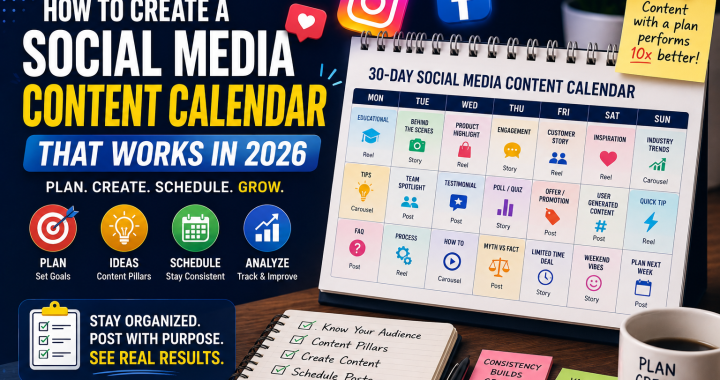
Posting randomly = No growth. Posting with a plan = 10x growth
If your business social media strategy looks like opening Instagram in the morning and thinking, “What should I post today?”, you’re not alone.
Many business owners and social media managers post whenever they have an idea, remember an upcoming promotion, or find a trending audio. The result? Inconsistent content, repeated topics, missed opportunities, and an audience that doesn’t know what to expect.
A well-organized social media content calendar can change that.
A content calendar helps you plan what to publish, when to publish it, which platform to use, and what result you want from each post. In 2026, when businesses are competing for attention across Reels, short-form video, Stories, carousels, and other formats, strategic planning is more important than simply posting more.
Let’s build a practical 30-day system you can actually use.
Why You Need a Content Calendar
A content calendar isn’t just a spreadsheet filled with post ideas. It’s a strategic roadmap for your social media marketing.
1. Stay Consistent
Consistency helps your audience recognize your brand and understand what you offer. Instead of posting five times one week and disappearing the next, you can maintain a predictable schedule.
2. Save Time
Batch planning allows you to create several posts at once. You can write captions, record videos, design graphics, and schedule content ahead of time.
3. Improve Content Quality
When you’re not rushing to publish something at the last minute, you have more time to research topics, improve your hooks, check visuals, and create stronger CTAs.
4. Connect Content With Business Goals
Every post should have a purpose. You may want to:
- Increase brand awareness
- Generate leads
- Drive website traffic
- Build trust
- Promote a product
- Increase engagement
- Educate your audience
A social media content calendar makes it easier to connect daily posts with larger business objectives.
What to Include in a Calendar
Your calendar can be simple. You don’t need a complicated system to get started.
A useful calendar should include:
- Date
- Platform
- Content topic
- Content pillar
- Format
- Caption or key message
- Visual/video requirements
- CTA
- Target audience
- Status
- Publishing time
- Performance results
For example:
| Date | Platform | Topic | Format | CTA | Status |
|---|---|---|---|---|---|
| Monday | Styling tips | Reel | Save this | Ready | |
| Tuesday | Customer story | Image | Comment | Draft | |
| Wednesday | New collection | Carousel | Shop now | Ready | |
| Friday | Behind the scenes | Reel | Follow us | Planned |
This simple structure can become your content calendar template and be reused every month.
Step-by-Step: How to Make a 30-Day Calendar
Wondering how to plan social media posts without spending your entire week on planning?
Follow these steps.
Step 1: Define Your Monthly Goal
Start with one or two measurable objectives.
For example:
Goal: Generate 30 qualified leads from Instagram.
Or:
Goal: Increase product page visits by 20%.
Your goal determines the type of content you need.
Step 2: Know Your Audience
Ask:
- Who are you targeting?
- What problems do they have?
- What questions do they ask?
- What content do they enjoy?
- What prevents them from buying?
Your content should answer real audience needs rather than simply talk about your business.
Step 3: Select Your Platforms
Don’t feel pressured to be everywhere.
Choose platforms where your customers are actually active.
For example:
B2B company: LinkedIn + Instagram
Local restaurant: Instagram + Facebook
E-commerce fashion brand: Instagram + TikTok + Pinterest
Step 4: Choose Your Content Formats
Mix different formats instead of publishing the same type of content every day.
Use:
- Reels
- Carousels
- Static images
- Stories
- Short videos
- Polls
- Testimonials
- Educational posts
- User-generated content
Step 5: Create Your Content Pillars
Content pillars are recurring themes that make content creation easier.
Choose around 4–6 core topics and rotate between them throughout the month.
Step 6: Fill the Calendar
Now assign specific topics to specific dates.
A good approach is to plan the entire month at a high level, then finalize captions and creative assets one week at a time.
Step 7: Schedule and Review
Once your content is ready, schedule it using your preferred social media management tool.
At the end of every week, review performance.
Ask:
What worked? What didn’t? What should we create more of?
That feedback should influence your next month’s plan.
Content Pillars for 2026
Your content strategy should balance value, personality, promotion, and community.
Here are useful content pillars for 2026:
Educational Content
Teach something your audience can immediately use.
Example:
“5 Ways to Improve Your Instagram Bio.”
Entertainment
Use humor, relatable situations, trends, and storytelling.
Promotional Content
Show your products, services, offers, launches, and benefits.
Social Proof
Share:
- Testimonials
- Reviews
- Case studies
- Customer stories
- Before-and-after results
Behind the Scenes
Show your team, production process, workspace, packaging, or daily operations.
Community Content
Ask questions, run polls, respond to comments, and encourage conversations.
A strong social media content calendar shouldn’t feel like one long advertisement. Give your audience reasons to follow you even when they’re not ready to buy.
Best Tools: Free + Paid
You don’t need expensive software to start.
Free Tools
Google Sheets: Excellent for simple calendars and team collaboration.
Notion: Useful for organizing content ideas, tasks, and publishing workflows.
Canva Free: Great for creating social media graphics and visual templates.
Paid Tools
Canva Pro: Offers additional design features and brand-management tools.
Buffer: Useful for scheduling and managing social media posts.
Later: Helpful for visual planning and scheduling.
Hootsuite: Designed for more advanced social media management and reporting.
Choose the tool that matches your workflow—not the one with the most features.
Example Calendar for a Clothing Brand
Imagine you’re managing an online clothing brand launching a summer collection.
Your content strategy could look like this:
| Day | Content | Format | Goal |
|---|---|---|---|
| Monday | Summer outfit inspiration | Reel | Reach |
| Tuesday | Customer testimonial | Carousel | Trust |
| Wednesday | New collection preview | Stories | Awareness |
| Thursday | “3 Ways to Style It” | Reel | Education |
| Friday | Product close-up | Photo | Sales |
| Saturday | Behind the scenes | Reel | Connection |
| Sunday | Weekend offer | Stories | Conversion |
This weekly schedule can then be repeated with fresh topics.
For example, Monday could feature casual outfits one week and office outfits the next.
Mistakes to Avoid
Even the best content calendar template won’t help if your strategy is flawed.
Posting Without a Goal
Every post doesn’t need to sell, but every post should have a purpose.
Making Everything Promotional
People don’t follow brands just to see advertisements.
Use the 80/20 principle as a starting point: roughly 80% valuable or engaging content and 20% promotional content. Adjust based on your audience and results.
Ignoring Trends Completely
Trends can increase reach, but don’t force every trend into your content. Use trends when they make sense for your brand.
Planning Too Far Ahead
A 30-day plan is useful, but don’t make every detail impossible to change. Leave room for current events, trends, customer questions, and timely opportunities.
Forgetting Analytics
Planning isn’t finished when you hit “Schedule.”
Review:
- Reach
- Engagement
- Saves
- Shares
- Comments
- Website clicks
- Leads
- Sales
Use those results to improve the next calendar.
Downloadable Content Calendar Template
Want to avoid building everything from scratch?
Create a downloadable content calendar template containing columns for:
Date → Platform → Content Pillar → Topic → Format → Caption → CTA → Status → Performance
Save it as a Google Sheet or Excel file so your team can duplicate it every month.
A reusable template turns how to plan social media posts from a stressful task into a repeatable process.
Conclusion
Random posting creates random results.
A strategic social media content calendar gives your business structure, consistency, and a clear direction. Instead of wondering what to post every morning, you’ll know exactly what you’re publishing, why you’re publishing it, and what action you want your audience to take.
Start with a 30-day plan.
Choose your platforms.
Define your content pillars.
Mix educational, entertaining, promotional, and community content.
Schedule your posts.
Then use analytics to improve your next month.
Most importantly, don’t try to create the “perfect” calendar. Create a system your team can actually maintain.
Once planning becomes a habit, consistent social media marketing becomes much easier—and much more strategic.
Comment ‘CALENDAR’ and I’ll DM you a free template