Meta Description: Learn the UI vs UX difference, why UI/UX matters for business websites in 2026, and how better design can improve trust, engagement, and sales.
“Beautiful website but no sales? That’s a UI vs UX problem.”
Your website looks modern. The colors are attractive. The images are professional. The animations look impressive.
But there is one problem:
Visitors are not becoming customers.
Why?
Because a website is not successful just because it looks beautiful. It also needs to be easy to use, simple to understand, fast to navigate, and designed around what customers actually want.
This is where UI and UX come in.
Understanding the ui vs ux difference is important for business owners, beginners, and anyone hiring a web designer in 2026.
Let’s make it extremely simple.
What Is UI?
UI stands for User Interface.
In simple words, UI is what your website looks like and what customers interact with.
Think about colors, buttons, fonts, images, menus, layouts, icons, and overall visual appearance.
Good UI makes a website look professional and organized.
3 Examples of UI
1. Website Buttons
A button saying “Buy Now” should look like something users can click.
Good color, size, spacing, and placement make the button easy to notice.
2. Website Colors
A professional business website may use a consistent color combination across its pages.
For example, a digital marketing agency might use a clean combination of blue, white, and black to communicate professionalism.
3. Fonts and Layout
If your website uses five different fonts, crowded sections, and inconsistent headings, visitors may find it difficult to read.
A clean layout creates a better visual experience.
This is a basic part of ui ux meaning: UI focuses heavily on the interface and visual interaction, while UX focuses on the complete experience.
What Is UX?
UX stands for User Experience.
UX is about how easy, useful, and comfortable your website is to use.
Imagine you visit an online store.
You find the product quickly.
You understand the price.
You can select your size.
You add the product to your cart.
Payment is simple.
Your order confirmation arrives immediately.
That is good UX.
3 Examples of UX
1. Easy Navigation
Suppose a customer wants to find your pricing page.
If they have to click through five different pages to find it, the UX is poor.
A good website makes important information easy to find.
2. Simple Checkout
Imagine adding a product to your cart and then being asked to complete ten different forms.
You might leave.
A simple checkout process creates a better experience and can increase conversions.
3. Easy Contact Process
A customer shouldn’t need to search everywhere for your phone number or WhatsApp button.
A clear Contact Us, Call Now, or WhatsApp button makes the next step obvious.
This is why understanding ui ux meaning matters when building a website that generates business.
UI vs UX Comparison Table
| UI | UX |
|---|---|
| Focuses on appearance | Focuses on overall experience |
| Colors and typography | Ease of use |
| Buttons and icons | Navigation |
| Visual layout | Customer journey |
| Images and animations | Website functionality |
| Makes the website attractive | Makes the website useful |
| Focuses on interaction design | Focuses on solving user problems |
The simplest way to understand the ui vs ux difference is:
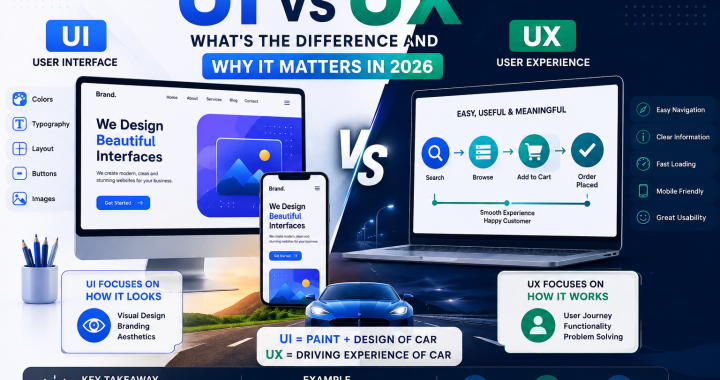
UI = How it looks.
UX = How it works and feels to use.
Real Analogy: Car
Here’s an analogy that makes it easy:
UI = Paint + Design of Car, UX = Driving Experience of Car
A car can have beautiful paint, stylish seats, and an amazing exterior.
That’s UI.
But if the steering is difficult, brakes don’t work properly, the seats are uncomfortable, and driving is frustrating, that’s poor UX.
The same thing happens with websites.
A beautiful website with confusing navigation is like a beautiful car that’s terrible to drive.
Why Both UI and UX Are Important
You don’t need to choose between UI and UX.
You need both.
Good UI Gets Attention
A professional design can immediately create a strong first impression.
Customers may judge your business based on how your website looks.
A clean interface can communicate:
- Professionalism
- Trust
- Quality
- Brand identity
- Credibility
Good UX Gets Results
Once visitors arrive, UX helps them complete their goal.
That goal could be:
- Buying a product
- Booking a service
- Filling out a form
- Calling your business
- Requesting a quote
- Sending a WhatsApp message
This is the real importance of ui ux 2026.
Your website should not simply look good. It should help your business achieve measurable results.
Amazon Is a Great Example
Amazon has average UI but best UX = that’s why they sell.
Amazon’s website may not always look like the most visually beautiful e-commerce site.
But customers can quickly search for products, compare options, check reviews, see prices, add items to carts, and complete purchases.
That’s powerful UX.
The lesson?
Don’t sacrifice usability just to make your website look fancy.
Common Mistakes Businesses Make
1. Focusing Only on Appearance
Some businesses spend hours choosing colors and animations but forget to make the website easy to use.
A beautiful website cannot compensate for a confusing customer journey.
2. Too Many Pop-Ups
Pop-ups can sometimes be useful.
But too many interruptions can frustrate visitors.
3. Complicated Navigation
Your customer shouldn’t need a map to understand your website.
Keep menus simple.
4. Ignoring Mobile Users
Most people browse websites using smartphones.
If your website looks great on desktop but terrible on mobile, you’re losing potential customers.
5. Slow Website
Large images, unnecessary animations, and poorly optimized pages can make websites slow.
Users don’t want to wait.
6. Hidden Call-to-Action
If you want customers to contact you, make the next action obvious.
Use clear buttons such as:
Get a Quote | Book Now | Call Us | Start a Project
How to Check If Your Website Has Good UI/UX
You don’t need to be a professional designer to perform a basic test.
Ask Someone to Use Your Website
Give your website to a friend or potential customer.
Don’t explain anything.
Ask them to:
- Find your main service.
- Find your pricing.
- Contact you.
- Find your location.
- Complete your main action.
Watch what happens.
If they keep asking, “Where do I click?”, your UX needs improvement.
Check Your Website on Mobile
Open your website on different smartphones.
Check:
- Are buttons easy to tap?
- Is text readable?
- Does everything fit the screen?
- Is navigation simple?
- Do forms work properly?
Check Your Main Goal
Ask yourself:
“What do I want visitors to do?”
If you’re a freelancer, it might be Book a Call.
For an e-commerce store, it might be Buy Now.
For a local business, it might be Call or WhatsApp.
Your design should guide visitors toward that goal.
Tools to Test UI/UX
Several tools can help you understand how users interact with your website.
Google PageSpeed Insights
Useful for checking website performance and identifying speed-related issues.
Google Analytics
Helps you understand visitor behavior, traffic sources, and important website actions.
Microsoft Clarity
Can help you understand how visitors interact with pages through features such as session recordings and heatmaps.
Figma
Figma is commonly used by designers to create website interfaces and prototypes before development.
The goal isn’t to use every tool.
The goal is to identify where users struggle and improve the experience.
Importance of UI/UX in 2026
The importance of ui ux 2026 is growing because customers have more choices than ever.
If your website is confusing, slow, difficult to navigate, or uncomfortable to use, customers can simply leave and choose a competitor.
A strong website should combine:
Good Design + Simple Navigation + Fast Performance + Clear Content + Easy Actions
That’s the winning combination.
The ui vs ux difference is simple:
UI makes your website look good. UX makes your website work well for your customers.
And when both work together, your website can become more than an online brochure.
It can become a powerful business tool.
Conclusion
UI and UX are not only topics for designers and developers.
They matter to every business owner who wants a website that attracts visitors and turns those visitors into customers.
Remember:
UI = Paint + Design of Car.
UX = Driving Experience of Car.
You need a beautiful car.
But more importantly, you need a car that people enjoy driving.
The same applies to your website.
Focus on attractive design, but never forget usability, speed, navigation, mobile experience, and your customer’s journey.
That’s the real ui ux meaning and why the importance of ui ux 2026 cannot be ignored.
If your website looks great but isn’t generating results, it may be time to look beyond appearance.
Comment ‘DESIGN’ and I’ll audit your website UI/UX for free.
Want me to also create a featured image for this UI vs UX blog in a modern digital-marketing style?